12 Best Event Planning Apps and Tools to Keep Every Detail Organized
Event planning rarely happens in one neat place. Guest responses may arrive through messages, deadlines sit in a spreadsheet, vendor details remain buried in email, and important decisions are scattered across several conversations.
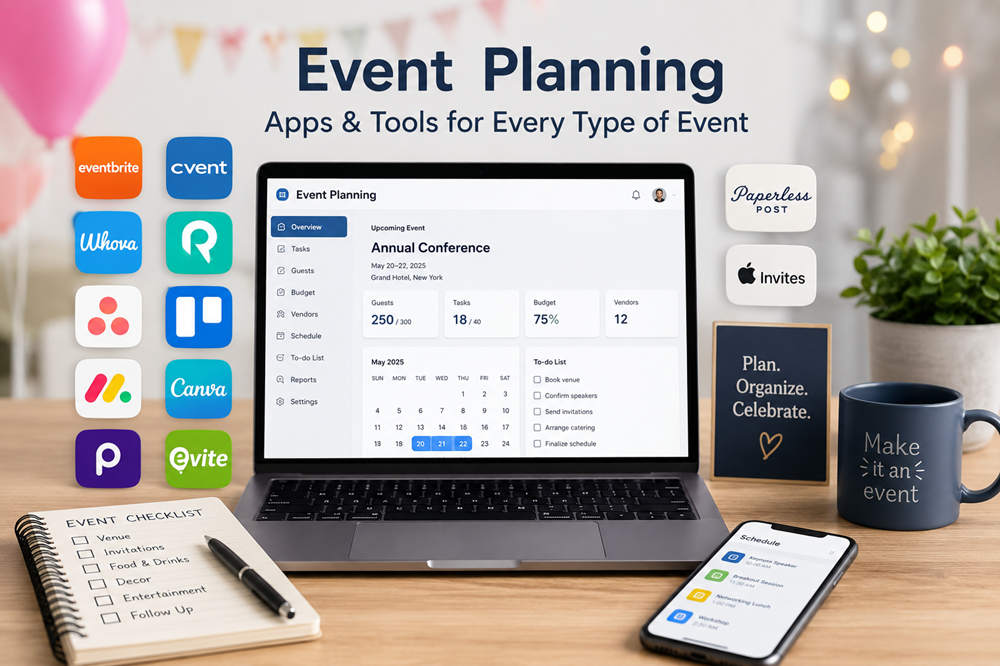
An event planning app can bring order to that process, but different tools solve different problems. Some manage ticket sales and attendee check-in, some coordinate teams and deadlines, and others focus on invitations, RSVPs, or visual materials. The best option is the one that supports the most demanding part of your event without making the rest of the process unnecessarily complicated.
12 Best Event Planning Apps and Tools
1. Eventbrite — Best for Ticketed and Public Events
Eventbrite is a practical choice for workshops, classes, concerts, festivals, fundraisers, tours, and other events that need public registration or ticket sales.
Organizers can create an event listing, set up free or paid ticket types, collect payments, communicate with attendees, and monitor registrations. Its organizer tools also support mobile ticket scanning, guest check-in, onsite sales, and attendance tracking.
Eventbrite is especially useful when the event needs to reach people beyond an existing guest list. Its public marketplace and promotional tools can help potential attendees discover the event while registration and payment remain connected to the same page.
Publishing an event is free, but ticketing and payment-processing fees may apply when tickets, add-ons, or donations are sold. Organizers should review the current fee structure before setting ticket prices.
2. Cvent — Best for Large and Complex Events
Cvent is built for conferences, trade shows, corporate meetings, hybrid programs, and organizations that manage many events throughout the year.
Its tools cover customized registration, event websites, email marketing, session management, attendee records, onsite check-in, mobile event experiences, reporting, and analytics. Additional products can support venue sourcing, room blocks, exhibitors, appointments, and event diagramming.
This breadth is valuable when an event has several attendee types, approval paths, ticket options, breakout sessions, speakers, sponsors, or hotel arrangements. Information can move through one connected system instead of being transferred manually between separate departments and files.
Cvent is powerful, but its scale may be excessive for a private celebration or small community gathering. It makes the most sense when event complexity justifies a professional platform and dedicated setup time.
3. Whova — Best for Conferences and Attendee Engagement
Whova is designed for conferences, association meetings, academic events, conventions, and other programs where attendees need more than a registration confirmation.
Organizers can manage registration, event information, schedules, check-in, announcements, sponsors, exhibitors, and analytics. Attendees can use the event app to build personal agendas, receive updates, join discussions, ask questions, access virtual sessions, and connect with other participants.
Its strongest advantage is the attendee experience. A schedule change, networking opportunity, speaker update, or exhibitor announcement can be delivered through the same app people are already using to navigate the event.
Whova is less compelling for a simple gathering where guests only need the time, location, and RSVP form. It is most useful when interaction, networking, or session participation is central to the event.
4. Planning Pod — Best for Venues and Event Businesses
Planning Pod is a venue-first platform for businesses that regularly sell, book, and host events. It can also support professional planners who need more operational control than a standard project-management app provides.
The platform includes booking calendars, lead pipelines, proposals, contracts, electronic signatures, invoices, payment schedules, floor plans, banquet event orders, timelines, checklists, vendor records, client portals, and reporting.
A venue can use it to follow an event from the first inquiry through the tour, signed contract, deposit, room layout, catering details, setup schedule, and final invoice. Keeping that information connected reduces the need to rebuild the same event across calendars, spreadsheets, PDFs, and payment tools.
Planning Pod is best suited to repeat professional use. Someone organizing one birthday party or neighborhood fundraiser is unlikely to need its sales, billing, and venue-operation features.
5. Asana — Best for Team Tasks and Accountability
Asana works well when an event involves several people, departments, or workstreams that must stay coordinated.
Tasks can be assigned to individual owners with deadlines, subtasks, attachments, dependencies, approval stages, and custom fields. Event templates can organize budgets, vendors, marketing, logistics, day-of responsibilities, and post-event follow-up.
Asana is particularly useful for showing how one deadline affects another. A designer may need approved copy before finishing the program, while printing cannot begin until the design is complete. Dependencies make those relationships visible and help the team identify delays before they reach the event date.
It is a coordination tool rather than a public ticketing platform, making it strongest behind the scenes.
6. Trello — Best for Simple Visual Planning
Trello turns an event plan into a visual board of lists and movable cards. Its straightforward layout works well for small teams, volunteers, student groups, couples, and first-time organizers.
A board might include lists such as Ideas, To Book, Waiting for Confirmation, In Progress, Ready for Event Day, and Complete. Cards can represent individual tasks and hold checklists, due dates, labels, attachments, comments, and assigned members.
The board provides a quick picture of progress without requiring everyone to interpret a detailed project report. Moving a card from one stage to another also makes routine updates simple.
Trello is most effective when the planning process can be expressed as a clear series of tasks. Events with complex registration, payments, seating plans, or venue operations will need additional tools.
7. monday.com — Best for Custom Event Workflows
monday.com is suited to teams that want to build an event-management workspace around their own processes.
Organizers can create connected boards for vendors, marketing, speakers, budgets, venues, attendees, and production schedules. Forms can collect RSVPs or internal requests, while calendar, timeline, and dashboard views show the same information from different perspectives. Automations can assign work, send reminders, or update statuses when defined conditions are met.
This flexibility is helpful for organizations with a repeatable event program. A submitted speaker form, for example, can create a record, notify the content team, set a review deadline, and feed information into a broader event dashboard.
The platform requires more initial design than Trello or a ready-made invitation app. Teams should establish consistent fields, naming rules, and ownership before adding elaborate automations.
8. Canva — Best for Invitations and Event Materials
Canva supports the visual side of event planning with customizable templates for invitations, posters, programs, menus, presentations, signs, schedules, and social media graphics.
A host or planning team can begin with a template and adapt the colors, typefaces, photographs, illustrations, and wording to suit the occasion. Designs can be downloaded for digital use, prepared for home or professional printing, or shared with collaborators for review.
Canva is particularly useful when many event pieces should feel coordinated. The invitation, welcome sign, program, table numbers, sponsor presentation, and social posts can all follow the same visual style.
Its role is design rather than event administration. Guest information, RSVPs, ticket sales, and vendor schedules should be managed elsewhere.
9. Partiful — Best for Casual Parties and Social Events
Partiful is designed for quickly organizing birthdays, dinners, house parties, campus gatherings, reunions, performances, and other social events.
Hosts can create a customizable event page, share it by text, email, messaging app, or link, and track responses as they arrive. Text blasts, automatic reminders, guest comments, polls, co-hosting, and shared photo albums keep communication attached to the event rather than spread across several group chats.
Partiful also supports ticket sales, capacity limits, special ticket options, and ticket scanning. That makes it useful for small paid events that need more than a private RSVP list but do not require an enterprise conference platform.
Its lively, informal presentation is part of its appeal, although it may feel out of place for a traditional formal event or a company that requires tightly controlled branding.
10. Evite — Best for Familiar Digital Invitations
Evite offers a recognizable and uncomplicated way to send invitations for birthdays, showers, graduations, holiday gatherings, weddings, dinners, and workplace celebrations.
Hosts can choose a free or Premium design, add event information, invite guests by email, text, or shareable link, and manage responses through a central guest list. The platform also supports automated reminders, guest messages, RSVP deadlines on eligible plans, and host updates to responses received offline.
Evite works well for hosts who want familiar invitation features without building a larger event website or workflow. Its broad design library also makes it easy to find an option suited to a common occasion.
It focuses on invitations and guest communication rather than production schedules, budgets, or vendor coordination.
11. Paperless Post — Best for Design-Focused Invitations
Paperless Post combines polished invitation designs with practical guest-management features. It is especially suitable for engagement parties, showers, formal dinners, milestone birthdays, weddings, galas, and professional gatherings where presentation matters.
Hosts can send invitations through email, text, or a shareable link and then track responses in one place. Guest questions can collect meal selections, dietary restrictions, adult and child counts, or other planning information. Hosts can also set response deadlines, manage capacity, send updates, and use mobile check-in for suitable events.
The platform stands apart from simpler invitation apps by connecting stationery-inspired design with more detailed RSVP options. Event pages can also hold schedules, directions, dress codes, registries, travel notes, and other information guests may need to revisit.
Costs depend on the selected design, format, features, and audience size, so the final guest list should be considered before choosing a paid option.
12. Apple Invites — Best for iCloud+ Hosts
Apple Invites creates a multimedia invitation experience built around Apple services.
Hosts can customize an invitation, share a link, manage the guest list, and track responses. Event pages can display directions through Maps and local weather information. Shared photo albums allow guests to contribute memories, while collaborative Apple Music playlists can help set the mood before and during the gathering.
An iCloud+ subscription is required to create and host an event. Guests, however, can receive an invitation and RSVP through the web even when they do not have an Apple device or iCloud+ subscription. Access to shared music features may have additional Apple Music requirements.
Apple Invites is a good fit for private gatherings where the invitation, photographs, music, and event details are more important than detailed project or vendor management.
What to Look for in an Event Planning App
Tasks and Timelines
Look for assignments, deadlines, reminders, checklists, dependencies, and calendar or timeline views. These features are particularly important when several people are responsible for different parts of the event.
Guest and RSVP Management
A useful guest system should show who has replied, who needs a reminder, and whether guests are bringing additional people. Meal selections, dietary needs, accessibility requests, and other questions may also need to be collected.
Payments and Budgets
Paid events may require ticket processing, refunds, payout tracking, or donation collection. Private and professional events may instead need expense categories, deposits, invoices, and reminders for outstanding balances.
Vendor and Venue Details
Events involving outside suppliers benefit from a central place for contacts, contracts, insurance documents, menus, floor plans, delivery windows, and payment dates.
Communication
Consider how the app handles confirmations, reminders, schedule changes, weather notices, parking instructions, internal comments, and urgent event-day updates. Guest messages and planning-team discussions may require separate channels.
Access and Integrations
Check whether organizers, guests, volunteers, and vendors can access the information they need without unnecessary accounts or technical steps. Calendar, email, payment, cloud-storage, and design integrations can also reduce manual data entry.
How to Choose the Right Event Planning App
- Define the event. Consider its size, format, location, audience, and level of formality.
- Identify the hardest part. Decide whether the main challenge is ticketing, team coordination, venue operations, visual design, or guest communication.
- Separate essentials from extras. Build the decision around features the event cannot function without.
- Consider every user. Think about the experience of hosts, team members, vendors, volunteers, and guests.
- Review the full cost. Include subscription charges, payment fees, ticketing fees, guest limits, user limits, and paid design elements.
- Test the mobile experience. Important information should remain easy to reach during setup, travel, check-in, and the event itself.
- Keep the system manageable. A smaller app used consistently is more reliable than a sophisticated platform no one keeps updated.
Can You Use More Than One Event Planning App?
Using more than one tool can be practical when each has a separate purpose. A team might manage deadlines in Asana, create invitations and signs in Canva, and collect registrations through Eventbrite. A private host might use Trello for preparations and Paperless Post for guest communication.
The important point is to avoid maintaining the same information in several places. Choose one official location for the guest list, one for the planning schedule, and one for approved files. Everyone involved should know which source is current.
Final Thoughts
The right event planning app should remove work rather than create another system to maintain. Choose a full event platform when registration and operations are complex, a project-management tool when coordination is the main challenge, or an invitation app when guest communication matters most.
Begin with the simplest option that covers the event’s essential needs. Add another tool only when it has a clear and distinct role.