Event Calendar Template: A Simple Layout for Organized Planning
An event calendar keeps upcoming dates, preparation deadlines, locations, and responsibilities in one place. It can be as simple as a monthly grid for family celebrations or as detailed as a shared spreadsheet covering dozens of school, community, or business events.
The three templates below provide a monthly view, a detailed event tracker, and a yearly overview. Copy them into a document or spreadsheet, then adjust the fields to suit the way you plan.
Event Calendar Template
Begin with the layout that best matches your planning needs. The monthly calendar is useful for seeing what is happening soon, while the detailed tracker holds information that will not fit inside a calendar square. The yearly overview helps distribute major events across several months.
To start using the templates:
- Add the relevant month, year, and dates.
- Enter confirmed events and fixed deadlines first.
- Place longer notes, contacts, and responsibilities in the event tracker.
Monthly Event Calendar
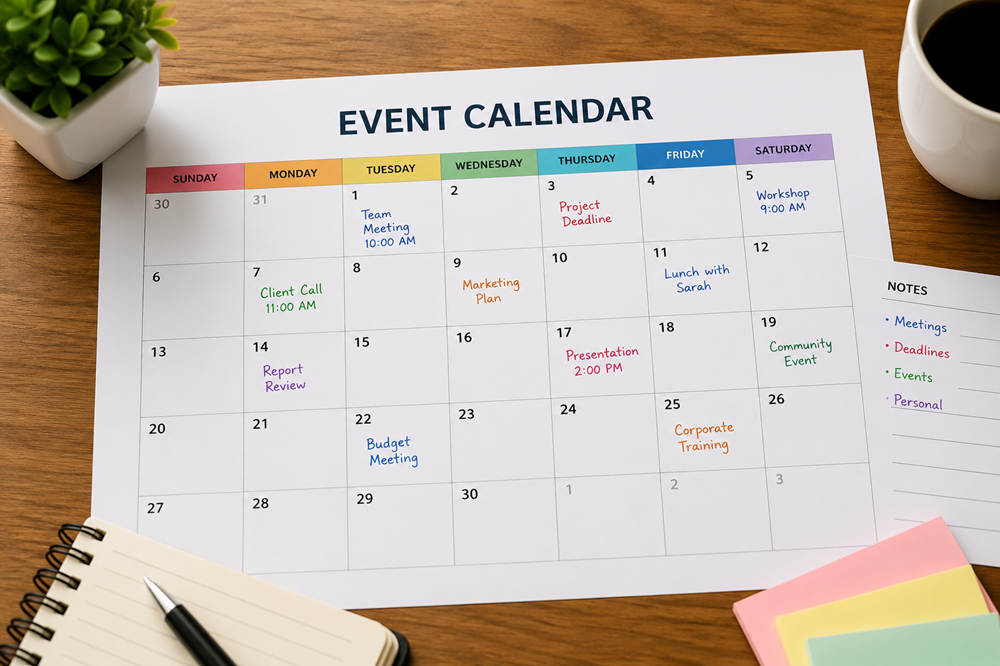
Use this undated calendar for events, appointments, registration periods, payment deadlines, and preparation milestones. Keep each entry short so the month remains easy to scan.
| Month: ____________________ Year: __________ | ||||||
|---|---|---|---|---|---|---|
| Sunday | Monday | Tuesday | Wednesday | Thursday | Friday | Saturday |
| Date: ____ | Date: ____ | Date: ____ | Date: ____ | Date: ____ | Date: ____ | Date: ____ |
| Date: ____ | Date: ____ | Date: ____ | Date: ____ | Date: ____ | Date: ____ | Date: ____ |
| Date: ____ | Date: ____ | Date: ____ | Date: ____ | Date: ____ | Date: ____ | Date: ____ |
| Date: ____ | Date: ____ | Date: ____ | Date: ____ | Date: ____ | Date: ____ | Date: ____ |
| Date: ____ | Date: ____ | Date: ____ | Date: ____ | Date: ____ | Date: ____ | Date: ____ |
| Date: ____ | Date: ____ | Date: ____ | Date: ____ | Date: ____ | Date: ____ | Date: ____ |
A date square might contain an entry such as “Spring fundraiser, 6 p.m.” or “Final guest count due.” Supporting information can then be added to the tracker below.
Event Details Tracker
The tracker provides space for information that is too detailed for the monthly view. Create one row for each event and update its status as plans develop.
| Event | Date and Time | Location | Organizer | Next Deadline | Status | Notes |
|---|---|---|---|---|---|---|
Additional columns may be useful for estimated attendance, registration links, accessibility arrangements, or budget approval. Avoid adding information that will not be updated regularly.
Yearly Event Overview
A yearly overview is designed for major dates rather than detailed planning. Use it to spread programs across the year, identify busy seasons, and decide when preparation should begin.
| Month | Major Events | Key Deadlines | Notes |
|---|---|---|---|
| January | |||
| February | |||
| March | |||
| April | |||
| May | |||
| June | |||
| July | |||
| August | |||
| September | |||
| October | |||
| November | |||
| December |
What to Record in an Event Calendar
The calendar should contain enough information to guide the next action without becoming a complete event-planning file. Most entries need the following details:
- Event name: Use the same title across the calendar, invitations, emails, and planning documents.
- Date and time: Include arrival or setup times when they affect access to the venue.
- Location: Record the address, room, meeting link, or online platform.
- Organizer: Identify the person responsible for answering questions or completing the next task.
- Deadline: Note the nearest important date, such as a payment, registration, delivery, or final headcount.
- Status: Label the event as proposed, tentative, confirmed, postponed, or canceled.
Guest lists, contracts, budgets, and long instructions are easier to manage in separate files. Add a link or short note showing where those documents are stored.
Choosing the Right Calendar Layout
Monthly Calendar
A monthly calendar is best for viewing upcoming events and identifying conflicts. It suits families, small organizations, schools, and community groups that need a clear picture of the next few weeks.
Because space is limited, use short entries. The event name, starting time, and most urgent deadline are usually enough.
Yearly Calendar
Choose a yearly layout when you need to see how major events are distributed across several seasons. It is useful for annual fundraisers, conferences, school programs, campaigns, and recurring celebrations.
Record only the most important dates at this level. Move each event into the monthly calendar or detailed tracker when active planning begins.
Detailed Spreadsheet
A spreadsheet is more suitable when events involve several organizers, venues, deadlines, or approval stages. It can also be sorted by month, owner, category, location, or status.
Keep the sheet focused on scheduling and coordination. Storing every planning detail in the same file can make urgent dates difficult to find.
How to Customize the Template
A few consistent adjustments can make the template easier to understand without overcrowding it.
- Create practical categories. Group events by type, department, location, or audience.
- Use limited color coding. Assign one color to each category and include a simple key.
- Mark tentative dates clearly. Do not format an unconfirmed event in the same way as a finalized booking.
- Enter recurring events first. Regular meetings and annual programs form the basic structure around which new events can be planned.
- Link longer instructions. Keep the calendar readable by placing extensive notes in a separate document.
Colors should not be the only way important information is communicated. Written labels such as “tentative,” “confirmed,” or “canceled” remain clear when the calendar is printed in black and white.
Using the Calendar for Different Types of Events
Weddings and Private Celebrations
A wedding calendar might include the ceremony, reception, rehearsal, showers, fittings, vendor meetings, payment dates, and RSVP deadline. For birthdays, anniversaries, graduations, or family reunions, it can track invitation dates, catering decisions, decoration orders, and venue access.
Community and School Events
Schools and community groups can record performances, fundraisers, sports days, meetings, volunteer activities, and registration periods. Adding permission-form deadlines, supply requests, and the responsible committee makes the calendar more useful for organizers.
Business and Promotional Events
A business calendar may cover conferences, workshops, launches, networking sessions, trade shows, and training days. Preparation dates could include speaker confirmation, registration opening, promotional launches, material approval, technical testing, and post-event follow-up.
How to Keep the Calendar Accurate
Choose one location as the official calendar rather than maintaining several conflicting copies. Printed versions may be convenient for personal planning, but a group usually needs a central digital version that reflects approved changes.
- Assign an owner. One person should check that names, dates, statuses, and responsibilities follow a consistent format.
- Update changes promptly. Record a new venue, postponement, or cancellation as soon as it is confirmed.
- Review upcoming dates. Check regularly for missing information, unresolved bookings, approaching deadlines, and duplicate entries.
- Control access. Give editing permission only to people responsible for maintaining events. Others can receive view-only access.
- Protect private information. Keep personal contact details, guest information, and confidential notes outside a publicly shared calendar.
When a significant change affects attendees or organizers, update the calendar and send a direct notice. A calendar is a central planning reference, but it should not be the only way urgent information is communicated.
An effective event calendar does not need complicated features. Start with accurate dates, clear ownership, visible deadlines, and a layout that matches the scale of your schedule. Review it regularly, remove outdated entries, and keep one dependable version that everyone involved can follow.