9 Best Hybrid Event Software Platforms for 2026
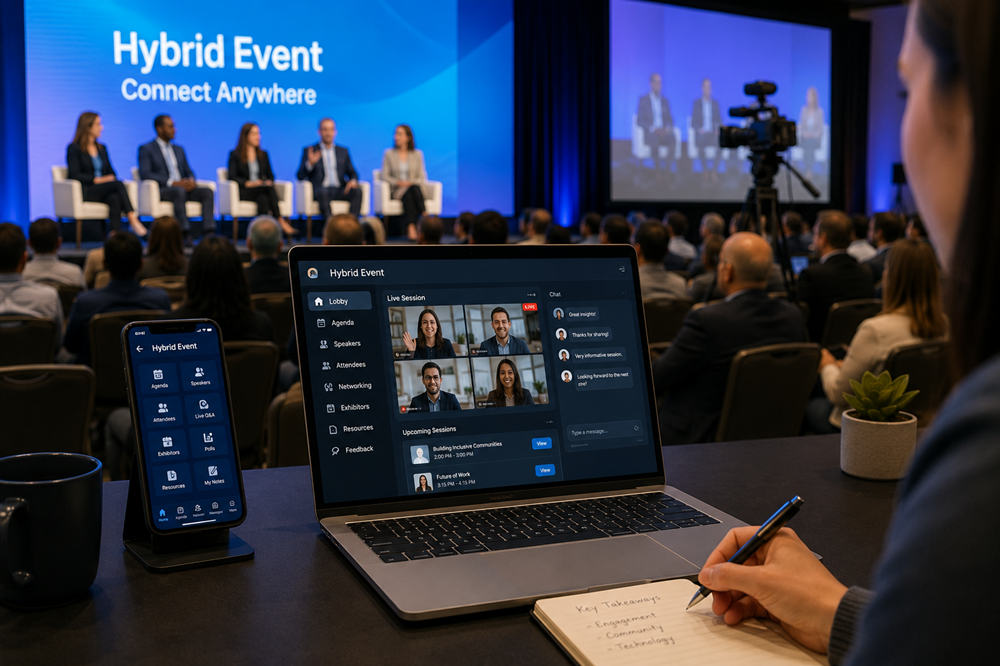
Running a hybrid event involves more than placing a camera at the back of a venue. In-person guests need smooth registration, useful mobile tools, and clear onsite communication, while remote attendees need reliable access to sessions and genuine ways to participate.
Hybrid event software connects these two experiences. Depending on the platform, it may handle registration, livestreaming, mobile agendas, audience interaction, networking, sponsor areas, onsite check-in, and post-event reporting.
The nine platforms below serve different event formats and organizational needs. The “best for” labels are editorial assessments based on current product capabilities rather than results from standardized hands-on testing.
What Is Hybrid Event Software?
Hybrid event software is a platform for managing events that people can attend either at a physical venue or online. It creates a shared system for registration, schedules, communications, content, attendee activity, and reporting.
A complete platform may include:
- Event websites and registration forms
- Separate ticket paths for onsite and remote attendees
- Live and on-demand video
- Multi-track agendas and breakout sessions
- Mobile event apps
- Onsite check-in and badge printing
- Polls, chat, Q&A, and audience reactions
- Attendee directories and meeting tools
- Sponsor or exhibitor spaces
- Attendance, engagement, and lead reports
This is broader than a basic video-meeting service. A meeting platform may be sufficient for one presentation, but a full event platform supports the attendee journey before, during, and after a conference.
The software also does not replace audiovisual production. A professional hybrid program may still require venue cameras, microphones, lighting, switching equipment, redundant internet connections, technicians, and a moderator dedicated to the remote audience.
How We Chose the Platforms
We reviewed current product information for established platforms that support both onsite and remote participation. The comparison considers registration, content delivery, engagement, mobile access, onsite operations, integrations, reporting, pricing structure, and suitability for different event formats.
The list includes broad enterprise systems, marketing-focused platforms, community-oriented conference tools, and more configurable options. It is intended to help readers build a shortlist rather than declare one platform the universal winner.
Pricing structures reflect public vendor information available in July 2026. Software packages and feature limits can change, so organizers should request a detailed proposal before making a final decision.
Hybrid Event Software at a Glance
| Platform | Best suited to | Standout capability | Pricing approach |
|---|---|---|---|
| Cvent | Large event portfolios | End-to-end event management | Custom quote |
| Bizzabo | B2B conferences | Event marketing and measurement | Custom quote |
| Zoom Events | Existing Zoom customers | Familiar video environment | License and attendance based |
| Whova | Associations and academic events | Community engagement | Custom quote |
| Webex Events | Enterprise multi-track events | Complex conference delivery | Custom quote or eligible enterprise plan |
| RingCentral Events | Interactive branded programs | Virtual event environment | Plan based |
| EventsAir | Professional event teams | Planning and operational workflows | Custom quote |
| Swoogo | Teams requiring customization | Registration and integrations | Per organizer user |
| SpotMe | Enterprise and regulated sectors | Data, compliance, and personalization | Custom quote |
Best Hybrid Event Software Platforms
1. Cvent — Best for Large Enterprise Event Programs
Best for: Corporations, universities, associations, and agencies managing complex conferences or a continuing portfolio of events.
Cvent’s hybrid event platform covers a wide portion of the event lifecycle. Organizers can build registration paths, manage communications, provide virtual content through Attendee Hub, coordinate exhibitors, and use OnArrival tools for check-in, badge printing, and attendance tracking.
Its connected products are particularly useful when several departments or regional teams need to manage events within the same system. Reporting can bring registration, session attendance, engagement, and other activity into a shared view.
Consider before choosing: Cvent is modular, so the final package may include more than one product. Define the required capabilities before requesting a proposal to avoid paying for tools that a smaller event will not use.
Pricing: Cvent provides customized quotes based on the selected products and event program.
2. Bizzabo — Best for B2B Conferences and Event Marketing
Best for: Marketing teams running customer conferences, industry summits, product events, and revenue-focused event programs.
Bizzabo connects event delivery with marketing and audience data. It supports registration, personalized schedules, onsite and remote engagement, mobile access, networking, sponsor experiences, and event analytics.
The platform is a strong fit when organizers want to understand how event participation relates to wider marketing activity. Its integration options can help move registration and engagement data into customer relationship management and marketing automation systems.
Consider before choosing: Bizzabo’s value is clearest for organizations that treat events as an important marketing channel. A small internal meeting may not require its broader campaign and measurement capabilities.
Pricing: Plans are discussed directly with the company and are tailored to the organization’s event needs.
3. Zoom Events — Best for Teams Already Using Zoom
Best for: Organizations that want to expand from familiar Zoom meetings or webinars into multi-session events.
Zoom Events supports simultaneous stages, multi-day programs, event lobbies, different ticket types, sponsor participation, attendee networking, and hybrid mobile experiences. Speakers and guests who already use Zoom may require less technical orientation than they would with an unfamiliar video system.
Organizers should distinguish Zoom Events from Zoom Meetings and standard Zoom Webinars. Each product serves a different level of event complexity, and some features are tied to specific plans.
Consider before choosing: A Zoom Meetings base subscription is required when purchasing Zoom Events. Compare the complete account cost rather than looking only at the event license.
Pricing: Zoom offers different licensing structures, including attendance-based options. Cost depends on the plan, capacity, and additional event services.
4. Whova — Best for Associations and Academic Conferences
Best for: Professional associations, universities, nonprofit organizations, and conferences where attendee discussion is central to the experience.
Whova’s hybrid event platform combines registration, livestreaming, agendas, announcements, digital exhibitor booths, networking, polls, Q&A, and an event app. Community boards and attendee messaging can keep conversations active between formal sessions.
These features make Whova particularly relevant to academic and membership-based events, where people often attend to exchange ideas and establish professional connections rather than simply watch presentations.
Consider before choosing: Confirm how livestreaming will connect with the venue’s cameras and production equipment. The attendee platform can organize the experience, but it does not remove the need for an audiovisual plan.
Pricing: Whova provides event-specific quotes based on attendance and selected services.
5. Webex Events — Best for Complex Multi-Track Events
Best for: Enterprise conferences, trade shows, sales kickoffs, networking events, and programs with several concurrent sessions.
Webex Events is designed for virtual, onsite, and hybrid programs that require more structure than a single webinar. It supports branded registration, multi-track agendas, livestreaming, attendee engagement, networking, sponsor content, and mobile access.
It may fit naturally into organizations already using Cisco collaboration tools. Certain Webex Suite enterprise agreements include access to Webex Events, although eligibility depends on the specific plan.
Consider before choosing: Verify what is included in the organization’s existing agreement and which production, support, integration, or onsite services require additional arrangements.
Pricing: Webex directs prospective customers to contact sales. Eligible enterprise customers may already have the product included in their agreement.
6. RingCentral Events — Best for Interactive Branded Experiences
Best for: Companies hosting launches, recruiting events, customer programs, conferences, or other events that need a distinct digital venue.
RingCentral Events supports virtual, hybrid, and onsite formats through a branded environment containing sessions, networking spaces, sponsor areas, and audience interaction tools. Its structure is intended to feel more like an event destination than a collection of separate video links.
The product was formerly known as Hopin Events. Organizers may still find the Hopin name in older contracts, tutorials, integrations, or internal planning documents.
Consider before choosing: Use current RingCentral documentation when configuring the platform. Instructions written for older Hopin versions may no longer reflect present plan names or workflows.
Pricing: RingCentral provides plan-based options for webinars and virtual, hybrid, or onsite events.
7. EventsAir — Best for End-to-End Event Operations
Best for: Professional planners who want attendee-facing tools and behind-the-scenes event administration in the same environment.
EventsAir connects registration, communications, sponsors, virtual sessions, networking, reporting, and onsite event delivery. Its OnAIR environment is integrated with the wider EventsAir system rather than operating as a separate streaming product.
The platform also addresses operational work such as team tasks, run sheets, session coordination, mobile access, and real-time event reporting. This can reduce the need to transfer information manually between planning and delivery tools.
Consider before choosing: A connected operational system requires detailed setup. Allow sufficient time to configure attendee types, workflows, permissions, communications, and reporting before registration opens.
Pricing: EventsAir builds customized packages around the event format and required services.
8. Swoogo — Best for Customization and Integrations
Best for: Experienced event teams that require configurable registration journeys, branded experiences, and connections to existing business systems.
Swoogo is a white-label platform for hybrid, virtual, and in-person events. It provides event websites, customized registration, automated communications, payments, reporting, integrations, and tools for directing different attendee groups through appropriate registration paths.
Its flexibility can be useful when an organization runs varied events or has detailed requirements for branding and data flows. Teams can also use integrations and API access to connect Swoogo with other systems.
Consider before choosing: Configuration is easier when requirements have already been documented. Define registration rules, attendee categories, integrations, reporting fields, and branding standards before building the event.
Pricing: Swoogo uses per-user pricing and does not charge separately for every event or registrant.
9. SpotMe — Best for Enterprise and Regulated Industries
Best for: Healthcare, pharmaceutical, financial, professional-services, and enterprise organizations with detailed data or compliance requirements.
SpotMe supports hybrid, virtual, and onsite events through web and mobile experiences. Organizers can create targeted agendas and communications, deliver live and recorded content, moderate Q&A, collect engagement data, and connect event activity with marketing or sales systems.
The platform places particular emphasis on data management, controlled attendee journeys, enterprise support, and compliance. Different participant groups can receive content and access suited to their roles.
Consider before choosing: Its enterprise services may be more extensive than a smaller organization needs. SpotMe is most relevant when support levels, data handling, and personalization are important procurement criteria.
Pricing: The company provides personalized plans following a demonstration and consultation.
How to Choose Hybrid Event Software
Define the Event Before Comparing Platforms
Begin with the actual program rather than a software feature list. A one-hour company briefing has different requirements from a three-day conference with several rooms, sponsors, workshops, remote speakers, and thousands of attendees.
Document the number of sessions, expected attendance, venue spaces, ticket types, speaker locations, registration rules, and length of on-demand access. This quickly separates essential capabilities from attractive extras.
Map Both Attendee Journeys
Evaluate what people must do at each stage of the event.
An onsite guest may need a QR code, printed badge, venue map, room alerts, session scanning, and a mobile agenda. A remote guest may need clear login instructions, captions, technical support, stable video, and an obvious way to submit questions.
The experiences do not have to be identical, but both groups should understand how to participate. Avoid designing every session for the room and treating online guests as spectators.
Choose Engagement Tools That Match the Purpose
A training event may need quizzes, moderated questions, and resource downloads. A trade show may depend on sponsor leads and appointment scheduling. An association conference may benefit more from attendee profiles, discussion boards, and small-group networking.
Useful options can include:
- Shared polls and Q&A
- Moderated session chat
- Attendee directories
- One-to-one meeting schedules
- Interest-based matching
- Small-group video rooms
- Community discussions
- Sponsor and exhibitor messaging
Select tools that support the event’s purpose rather than enabling every interactive feature simply because it is available.
Plan the Audiovisual Setup Separately
Ask how the software will connect with venue production. Determine how presentations, camera feeds, remote speakers, audience questions, and prerecorded content will enter the platform.
The production plan may need:
- Cameras and camera operators
- Presenter and audience microphones
- Video switching and graphics
- Presentation computers
- Streaming encoders
- Wired primary and backup internet connections
- Remote-session moderators
- Backup recordings or holding slides
Clarify whether these services come from the venue, an audiovisual company, the software provider, or the organizer’s internal team.
Check Accessibility and Language Support
Review registration pages, event websites, mobile apps, livestreams, and recordings—not only the main virtual auditorium. The Web Content Accessibility Guidelines provide a useful framework for assessing whether digital content can be used by people with different visual, auditory, physical, speech, and cognitive needs.
Relevant capabilities may include:
- Live and corrected captions
- Keyboard navigation
- Screen-reader support
- Visible focus indicators
- Adjustable text and sufficient contrast
- Accessible registration forms
- Translated captions or interpretation
- Recordings with edited transcripts
Ask vendors for current accessibility documentation, such as an accessibility conformance report or VPAT. A general statement that a platform is accessible does not show how individual features were tested or where limitations remain.
Review Integrations, Data, and Security
Identify where registration and engagement data must go after the event. Common connections include customer relationship management systems, marketing automation tools, payment gateways, membership databases, learning platforms, and business intelligence software.
Confirm who owns the attendee data, where it is stored, how it can be exported, and how long the vendor retains it. Organizations handling sensitive information should also examine:
- Single sign-on and multifactor authentication
- Role-based permissions
- Encryption
- Data residency
- Subprocessors
- Retention and deletion controls
- Security certifications and audit reports
- Service-level commitments
- Incident-response procedures
For higher-risk purchases, use a documented supplier assessment. The NIST guidance on cybersecurity supply chain risk management emphasizes assessing supplier risk before entering an agreement rather than relying on a single security claim.
Compare the Total Cost
Event software may be priced by organizer, registration, attendee, event, month, year, or feature package. The license is only one part of the budget.
A complete comparison should include:
- Platform and organizer licenses
- Registration or payment charges
- Attendance limits
- Video streaming and storage
- Mobile app access
- Badge-printing equipment and supplies
- Onsite support
- Custom branding
- Integrations and API access
- Implementation and training
- Audiovisual production
Ask every shortlisted vendor to price the same event scenario. This produces a more useful comparison than placing unrelated starting prices beside one another.
Run a Realistic Rehearsal
A sales demonstration shows the platform under controlled conditions. A rehearsal reveals how it works with the actual speakers, venue, internet connection, agenda, production equipment, and staff responsibilities.
Test the attendee experience on desktop and mobile devices. Submit questions, change a session time, send an announcement, switch to a backup video, and simulate a remote speaker losing connection.
The rehearsal should also establish who has authority to pause a session, change a stream, contact attendees, or move to a backup plan when something goes wrong.
When a Simpler Tool May Be Enough
Not every event needs a full hybrid management platform. A standard meeting or webinar service may be sufficient for a short presentation, internal briefing, small workshop, or single-room program.
A simpler tool may work when the event does not require:
- Multiple simultaneous sessions
- Complex paid registration
- Onsite badges and session scanning
- Attendee matchmaking
- Sponsor or exhibitor areas
- A branded mobile app
- Personalized agendas
- Detailed lead tracking
Using fewer tools can reduce cost, training, and setup time. The deciding factor is whether the chosen service gives remote attendees reliable access and appropriate opportunities to participate.