Total Party Planner Login: How to Access Your TPP Account
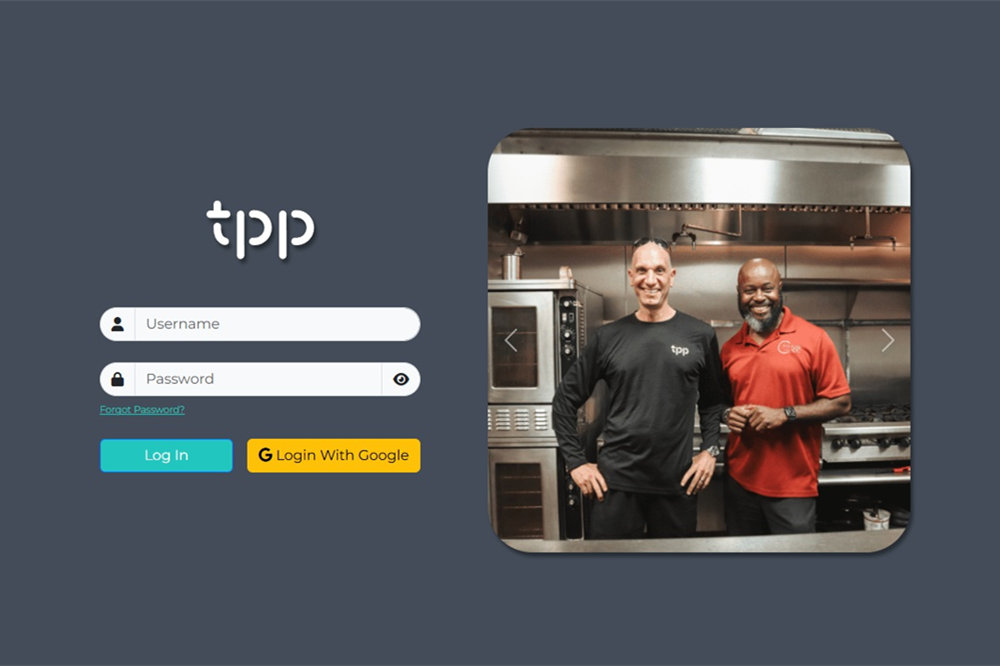
If you need to log in to Total Party Planner, the easiest starting point is the official TPP web application. Existing users can sign in with their username and password, while accounts configured for Google authentication can use the Google login option.
Total Party Planner also has separate access points for TPPsales and its Client Portal. If your usual credentials are not working, first make sure you are trying to enter the right part of the platform.
Total Party Planner Login
The official Total Party Planner website links existing users to the TPP web application at app.totalpartyplanner.com.
To sign in:
- Open the Total Party Planner login page.
- Enter your username.
- Enter your password.
- Select Log In.
The page also offers Login With Google for accounts that use Google authentication.
If you found a TPP login page through a search engine or an old bookmark, going through the company’s main website is a simple way to confirm that you are using the current regular login.
Forgot Your Total Party Planner Password?
If you cannot remember your password, select Forgot Password? beneath the login fields. This takes you to Total Party Planner’s password reset page.
Enter your username there and TPP will send instructions for resetting your password by email.
If the reset message does not appear, check your spam or junk folder. If you still cannot recover the account, contact TPP support rather than repeatedly trying different passwords.
Other Total Party Planner Access Points
Not everyone who uses a Total Party Planner product signs in through exactly the same screen. TPPsales and the Client Portal serve different purposes, so knowing which one you need can prevent unnecessary login problems.
TPPsales
TPPsales is Total Party Planner’s CRM environment for managing sales-related activity such as contacts and leads.
Access to TPPsales can be controlled by your organization’s TPP administrator. Total Party Planner’s Help Center notes that users may encounter an access error when they have not been given permission to use the CRM. Only administrators can update those permissions through the user-management settings.
If you can enter the main TPP system but cannot open TPPsales, ask your organization’s administrator to check your CRM access before assuming that your password is the problem.
Client Portal
The Total Party Planner Client Portal is intended for clients working with a caterer or event business that uses TPP. It is different from the regular staff login.
Through the portal, clients may be able to review event information, leave comments, approve details, view proposals, and pay invoices, depending on what the catering company has made available.
Clients should normally use the portal link provided by the catering company. If you have lost that link or it no longer works, contact the business handling your event and ask for a new or updated Client Portal link rather than trying to use the regular TPP staff login.
What to Do If You Cannot Log In
If the Total Party Planner login is not working, work through a few basic checks before contacting support.
Check your login details
Make sure the username and password are entered correctly. If your browser automatically fills the password field, try typing it manually in case the saved password is outdated.
Check Caps Lock
The TPP login page includes a Caps Lock warning. If Caps Lock is accidentally enabled while you enter your password, turn it off and try again.
Confirm that you are using the right TPP area
A standard TPP user, a TPPsales user, and a catering client may not use the same access point. If your credentials are being rejected, confirm which system you are actually supposed to use.
Use the password reset option
If you know your username but are unsure about the password, use the official reset process. This is more useful than repeatedly guessing and helps rule out an incorrect saved password.
Try basic browser troubleshooting
If the page itself is not displaying or responding correctly, reload it or try a current version of another browser. A temporary browser or connection problem can sometimes look like an account problem.
If several people in the same organization suddenly have trouble accessing TPP, the issue may not be tied to one user’s credentials. In that situation, check with your account administrator or contact Total Party Planner support.
Contact Total Party Planner Support
If you have confirmed that you are using the correct login and still cannot access your account, Total Party Planner provides direct support for existing customers.
The company’s official contact information currently lists:
- Email: [email protected]
- Phone: (804) 550-0505
- Hours: Monday through Friday, 9:00 a.m. to 6:00 p.m. EST
When asking for help, explain which TPP area you are trying to access and what happens when you attempt to log in. Do not send your password by email.
Frequently Asked Questions
Why can’t I access TPPsales if my regular TPP account works?
Your account may not have permission to use TPPsales. TPP administrators control CRM access for users, so ask your organization’s administrator to check your permissions if the main application works but TPPsales does not.
How do clients access the Total Party Planner Client Portal?
Clients normally access the portal through a link supplied by the caterer or event business using Total Party Planner. If you cannot find the link, contact that business and ask them to resend it.
Getting Back Into Total Party Planner
For most existing users, the official Total Party Planner web login is the right place to start. If you cannot sign in, check your credentials and use the password-reset option when needed.
If the problem involves TPPsales, your administrator may need to update your access. If you are a catering client, use the Client Portal link provided by the business handling your event. For account problems that cannot be resolved through these steps, contact Total Party Planner support directly.
Featured Image Source: app.totalpartyplanner.com