
Event Technology Services: What They Include and How to Choose a Provider
Modern events often depend on several connected systems, from registration and sound to livestreaming and audience engagement. An event technology service brings those tools together and provides the people needed to plan, test, and operate them.
The right provider can reduce pressure on the organizing team while helping guests, speakers, and remote participants move through the event without unnecessary technical problems.
What Are Event Technology Services?
Event technology services are professional services used to plan, supply, configure, and operate the technology required for an event. They may include equipment, software, internet access, technicians, production planning, and onsite support.
A provider might handle one specific need, such as sound for a reception, or manage an entire technical production involving registration, presentation screens, stage lighting, cameras, livestreaming, and event apps.
The central benefit is coordination. Instead of asking the organizer to manage every platform, device, and technical vendor independently, one team helps ensure that the systems work together.
Event Technology Services vs. Event Software
Event software is a particular digital tool, such as a registration platform, ticketing system, mobile app, webinar platform, or virtual event space.
An event technology service includes the professional work required to use one or more of those tools effectively. The provider may help choose the software, configure the settings, connect it to other systems, train staff, monitor its performance, and resolve problems during the event.
For example, an organizer can purchase a registration platform and build the entire process alone. A managed service may instead create the registration form, organize ticket types, prepare confirmation emails, connect attendee records to the check-in system, and support guests at the entrance.
Software provides the tool. A service provides the planning, technical knowledge, and hands-on assistance surrounding it.
What Can Event Technology Services Include?
The services required will depend on the event’s size, format, venue, audience, and program. Some providers specialize in a single area, while full-service teams manage several connected systems.
Audio, Video, and Lighting
Audio, video, and lighting services may include microphones, speakers, mixing equipment, projectors, presentation screens, LED displays, cameras, stage monitors, decorative lighting, and spotlights.
The provider should design the setup around the room rather than simply deliver equipment. Room size, acoustics, seating, stage position, power access, and audience sightlines all affect what is needed.
A simple gathering may require only background music and a wireless microphone. A conference or performance may need several screens, presentation switching, camera feeds, sound mixing, and lighting cues operated throughout the program.
Registration and Onsite Check-In
Registration services may cover event websites, ticket sales, payment processing, confirmation messages, guest lists, session selection, and attendee records.
On the event day, technology can support QR-code scanning, self-service kiosks, walk-in registration, attendance tracking, and on-demand badge printing. These systems are most effective when the registration records, devices, printers, staffing plan, and internet connection have been tested together.
The provider should also establish a straightforward process for correcting guest information and handling people who arrive without a confirmation or advance registration.
Livestreaming and Hybrid Event Support
Livestreaming services can include cameras, microphones, presentation feeds, streaming platforms, recording, captions, and technical monitoring.
A hybrid event requires coordination between the physical venue and the online experience. Remote viewers must be able to hear speakers clearly, read presentation materials, and follow transitions without seeing the behind-the-scenes activity taking place in the room.
The provider may also support remote speakers, online questions, virtual moderators, and communication between the onsite production team and the streaming platform.
Event Apps and Audience Engagement
An event app can place schedules, speaker details, venue maps, session materials, announcements, and attendee messages in one location. Larger events may also use apps for personalized agendas, networking, sponsor information, appointment booking, or session check-in.
Audience engagement tools may include live polls, submitted questions, quizzes, surveys, and moderated discussions. Each feature should have a clear purpose. Technology that constantly asks guests to switch devices or open new platforms can distract from the event instead of improving it.
Essential information should remain easy to access for guests who do not download the app or who have limited connectivity.
Internet and Technical Infrastructure
Reliable connectivity is particularly important when an event uses digital check-in, cloud-based presentations, livestreaming, event apps, or connected demonstrations.
Depending on the production, the technical team may arrange dedicated bandwidth, wired connections, separate networks for staff and attendees, charging stations, or backup internet access.
The provider should coordinate with the venue before deciding on a network plan. Available bandwidth, connection points, security restrictions, service charges, and venue rules may limit which options can be used.
Onsite Technical Support
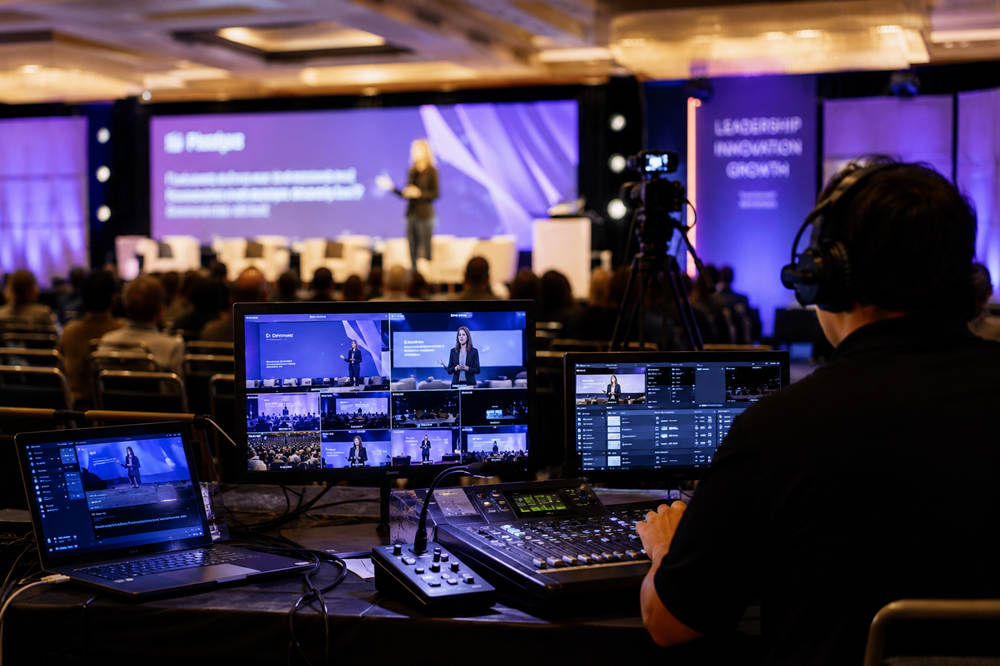
Onsite technicians install and operate the event systems. They may conduct sound checks, prepare presentation files, fit speakers with microphones, control lighting, manage video playback, monitor a livestream, and assist the registration team.
The number of technicians should reflect the complexity of the event. A straightforward meeting may need one general technician, while a multiroom conference may require separate support for presentation management, audio, video, streaming, and registration.
Responsibilities should be assigned before guests arrive so everyone knows who receives speaker files, approves last-minute changes, communicates with the venue, and makes technical decisions during the program.
When Should You Hire an Event Technology Provider?
Not every event needs a full production company. A small gathering with one microphone and a playlist may be manageable with basic venue equipment.
Professional support becomes more valuable when an event involves:
- Several rooms or simultaneous sessions
- Multiple speakers and presentation files
- Livestreaming or remote participants
- Paid registration or several ticket types
- Onsite badge printing or controlled access
- Large video displays or detailed lighting
- Live entertainment or performances
- Audience polling or networking tools
- Recordings that cannot be recreated
- A complicated venue or internet setup
Outside assistance may also be worthwhile when the organizing team has limited technical experience. The person welcoming guests or coordinating speakers should not have to stop repeatedly to repair a microphone, reload a presentation, or troubleshoot the stream.
Hiring a provider does not mean outsourcing every system. Organizers can request support only for the areas that carry the greatest technical risk.
How the Event Technology Process Works
Technology should be planned alongside the program, venue layout, and guest experience. Adding it shortly before the event leaves less time to identify venue limitations, integration problems, and staffing needs.
Planning and Technical Assessment
The provider begins by reviewing the purpose of the event, expected attendance, venue, schedule, speakers, entertainment, registration process, presentation content, and online audience.
The discussion should focus on what attendees need to see, hear, access, and do. It should also identify limitations such as restricted setup hours, poor room acoustics, limited power, or weak internet coverage.
A venue visit may be useful for a larger production. The technical team can inspect room dimensions, loading areas, control positions, electrical access, installed equipment, and possible cable routes.
System Design and Coordination
After the requirements are defined, the provider creates a technical plan covering equipment, platforms, staffing, room layouts, setup times, and vendor responsibilities.
The plan must align with the event schedule. Technicians need to know when rooms become available, when speakers will arrive, when files must be submitted, and when rehearsals can take place.
Coordination is especially important when the venue, planner, entertainment team, decorator, registration company, and technology provider all have related responsibilities. Each task should have one clearly identified owner.
Setup, Testing, and Rehearsal
The team installs the equipment and tests the complete system before the event. This may include microphones, speakers, screens, cameras, lighting, internet connections, presentation files, videos, and streaming destinations.
A rehearsal is particularly useful for award programs, performances, remote presentations, panel discussions, and events with precisely timed media. It gives speakers and technicians an opportunity to practice microphone use, presentation cues, entrances, video playback, and transitions.
Live Operation and Post-Event Delivery
During the event, technicians operate the equipment, monitor system performance, support speakers, and respond to issues without shifting responsibility back to the organizing team.
After the event, the provider may remove equipment and deliver agreed materials such as recordings, reports, presentation files, or attendee-data exports. The contract should state what will be delivered, in which format, and by what date.
What Affects the Cost of Event Technology Services?
Event technology costs vary because every production has a different combination of equipment, labor, software, connectivity, and venue requirements. An accurate estimate requires a detailed scope rather than a general price per guest.
Common cost factors include:
- Event size: Larger rooms may require more powerful sound, additional screens, and more equipment.
- Number of spaces: Each stage, ballroom, breakout room, or registration area may need its own setup.
- Event duration: Longer and multiday events involve additional rental and technician hours.
- Production complexity: Multiple cameras, remote speakers, detailed lighting cues, and live entertainment require more planning and operation.
- Internet requirements: Dedicated bandwidth, wired access, managed networks, and backup connections may be billed separately.
- Setup and removal: Short access windows, overnight work, and weekend labor can increase the cost.
- Travel and delivery: Freight, transportation, parking, lodging, and loading charges may apply.
- Rehearsals: Additional access to the venue, equipment, and technicians may be necessary.
- Recording and editing: A basic recording generally requires fewer resources than edited videos with graphics, captions, and separate session files.
Venue policies can also affect the final price. Some venues reserve selected services, such as rigging, power, internet, or parts of the audiovisual setup, for an in-house or designated provider. An outside company may require approval or incur access, supervision, or coordination charges.
Request an itemized proposal that separates equipment, labor, software, internet, delivery, travel, overtime, and optional services. This makes it easier to compare providers and identify costs that may otherwise appear later.
How to Choose an Event Technology Service Provider
A strong provider should be technically capable, but it should also be able to explain the plan clearly to organizers who are not technology specialists.
Look for Relevant Event Experience
Ask about projects with a similar format, audience size, venue type, and level of complexity. A company that regularly produces concerts may not approach a conference in the same way as a team experienced with presentations, panels, and breakout sessions.
Relevant experience helps the provider anticipate practical needs, such as managing several panel microphones, coordinating remote speakers, or preparing rapid presentation changes during an awards program.
Request a Detailed Scope of Work
The proposal should list the equipment, platforms, technician roles, setup hours, rehearsal time, event coverage, removal schedule, and additional charges.
It should also identify what the organizer must provide, such as final presentation files, speaker schedules, brand assets, licensing permissions, or venue approvals.
A broad promise of “full technical support” is not enough. Both parties should be able to see exactly what is included and what falls outside the quoted price.
Confirm Compatibility and Integrations
Registration records may need to connect with the check-in system, event app, email platform, badge printers, or reporting tools. Ask how information will move between the systems and who is responsible for each connection.
The provider should also confirm supported file formats, devices, browsers, and presentation requirements. Important integrations and media files should be tested before the event rather than assumed to work.
Review the Backup Plan
A provider should be able to explain what happens if an essential system fails. The backup plan may include spare microphones, a second presentation computer, local copies of online files, replacement cables, backup internet service, or recorded versions of remote presentations.
The strongest plans focus on systems whose failure would stop the program, prevent guests from entering, or cause important content to be lost.
Confirm Accessibility Support
Ask whether the provider can support captions, assistive listening systems, accessible registration forms, keyboard navigation, screen-reader-compatible content, and readable presentation formats.
The ADA’s effective communication guidance includes tools such as captioning, assistive listening devices, interpreters, and accessible electronic information. These requirements may involve additional specialists, so accessibility should be discussed during planning rather than shortly before the event.
Protect Attendee Data
Registration systems and event apps may collect names, contact details, payment information, schedules, attendance records, and survey responses. The organizer should understand what is collected, why it is needed, and who can access it.
The provider should explain where data is stored, how it is protected, how long it is retained, and how quickly a security incident must be reported. Subcontractors should be held to the same privacy and security requirements.
The Federal Trade Commission’s data-security guidance advises businesses to collect only the information they need, protect it appropriately, and dispose of it securely. The contract should therefore state when the provider must return or delete event data after the service ends.
Establish Clear Communication
Ask who will serve as the primary technical contact during planning and who will lead the onsite team. The organizer should know where to send changes, questions, speaker files, and approvals.
For a complex event, the provider should also explain how urgent problems are escalated and who has authority to adjust the technical plan when an issue affects the schedule.
Questions to Ask Before Signing a Contract
- Which equipment, platforms, licenses, and services are included?
- How many technicians will be onsite, and what will each person manage?
- Who is the main contact during planning and on the event day?
- Does the venue restrict the use of outside technology providers?
- How much setup, testing, and rehearsal time is included?
- When must presentation files and speaker information be submitted?
- What backup equipment and contingency plans will be available?
- Are delivery, travel, parking, service charges, and overtime included?
- Which accessibility services can the provider support?
- Who can access attendee information, and when will it be deleted?
- What will be delivered after the event, and when?
- What ownership, access, editing, and distribution rights does each party have for recordings, graphics, presentation files, and attendee data?
The answers should appear in the contract or written scope of work. Clear documentation is more dependable than verbal assurances, particularly when the event is months away or several teams are involved.
Choosing Technology That Supports the Event
The best event technology provider is not necessarily the company offering the most equipment or features. It is the one that understands the event, assigns responsibilities clearly, tests essential systems, and provides dependable support when plans change.
When the technology is managed well, it becomes almost invisible. Guests can enter smoothly, hear and see the program, participate without confusion, and remain focused on the event itself.